Back to 017: prepare Main2Activity for the RTDB track
This lesson creates a UI shell for login before deep Firebase work.
In this step we:
- Create
LoginActivityfrom Android Studio GUI (Empty Views Activity) inactivities. - Mark it as
Launcher Activityfrom the GUI wizard. - Build login screen fields and buttons (username, password, login, login with Google).
- Temporarily skip real auth and auto-navigate to
MenuActivityafter a short delay.
We intentionally do not connect authentication yet.
Step 1 - Create LoginActivity from GUI
In Android Studio:
- Right-click package
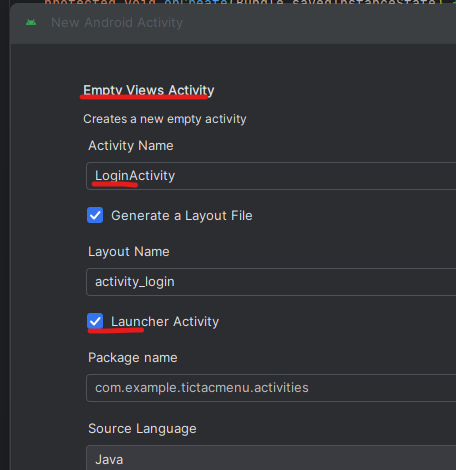
.../activities. New->Activity->Empty Views Activity.- Name:
LoginActivity. - Keep package under
activities. - Check
Launcher Activity. - Finish.
When creating the activity from GUI, use the launcher checkbox as shown:
Step 2 - Manifest sanity check (single launcher)
Update AndroidManifest.xml Because previous steps may already have MenuActivity as launcher, verify there is only one MAIN/LAUNCHER entry (we can expect 2 and you’ll have to update this manually. main Menu’s entry the same as Main’s entry)
Target state:
LoginActivityis launcher.MenuActivityis regular activity (no launcher intent-filter, and notexported).
If both activities have launcher intent-filters, app start behavior becomes inconsistent. Depending on device/launcher/Android version you can get:
- Two app icons,
- A chooser dialog (“Complete action using…”),
- Unpredictable “which one opens” behavior.
Note: When a behavior has intent-filter and is exported it can be launched directly from other applications.
Step 3 - Build initial login XML shell
Replace the content of app/src/main/res/layout/activity_login.xml with the below xml so you have:
- Username (or email) field
- Password field
- Remember me checkbox (for later SharedPreferences lesson)
- Login button
- Login with Google button
<?xml version="1.0" encoding="utf-8"?>
<LinearLayout xmlns:android="http://schemas.android.com/apk/res/android"
    android:layout_width="match_parent"
    android:layout_height="match_parent"
    android:id="@+id/main"
    android:orientation="vertical"
    android:padding="24dp"
    android:gravity="center_horizontal">

    <TextView
        android:id="@+id/tVtitle"
        android:layout_width="match_parent"
        android:layout_height="wrap_content"
        android:gravity="center"
        android:text="Login"
        android:textStyle="bold"
        android:textSize="28sp"
        android:layout_marginBottom="20dp" />

    <EditText
        android:id="@+id/eTemail"
        android:layout_width="match_parent"
        android:layout_height="wrap_content"
        android:hint="User name / e-mail"
        android:inputType="textEmailAddress" />

    <EditText
        android:id="@+id/eTpass"
        android:layout_width="match_parent"
        android:layout_height="wrap_content"
        android:layout_marginTop="12dp"
        android:hint="Password"
        android:inputType="textPassword" />

    <CheckBox
        android:id="@+id/cBstayconnect"
        android:layout_width="match_parent"
        android:layout_height="wrap_content"
        android:layout_marginTop="8dp"
        android:text="Remember me" />

    <Button
        android:id="@+id/btn"
        android:layout_width="match_parent"
        android:layout_height="wrap_content"
        android:layout_marginTop="16dp"
        android:onClick="onLoginClick"
        android:text="Login" />

    <Button
        android:id="@+id/btnGoogleSignIn"
        android:layout_width="match_parent"
        android:layout_height="wrap_content"
        android:layout_marginTop="8dp"
        android:onClick="onGoogleLoginClick"
        android:text="Login with Google" />

</LinearLayout>
3.1 Required cleanup: move UI texts to strings.xml
We consistently teach string resources, so students should not leave hardcoded texts in the final XML.
Each student should replace these hardcoded values with @string/... entries in strings.xml:
"Login""User name / e-mail""Password""Remember me""Login with Google"
Do this as a small cleanup phase after the layout compiles.
Step 4 - Temporary delayed navigation to MenuActivity
Until Firebase auth is wired, use delayed launch to skip login logic.
Edit app/src/main/java/.../activities/LoginActivity.java.
Below is a diff against the current GUI-generated file in C:\Users\3stra\AndroidStudioProjects\TicTacMenu:
 package com.example.tictacmenu.activities;

+import android.content.Intent;
+import android.content.SharedPreferences;
 import android.os.Bundle;
+import android.os.Handler;
+import android.os.Looper;
+import android.view.View;
+import android.widget.CheckBox;
+import android.widget.Toast;

 import androidx.activity.EdgeToEdge;
 import androidx.appcompat.app.AppCompatActivity;
 import androidx.core.graphics.Insets;
 import androidx.core.view.ViewCompat;
 import androidx.core.view.WindowInsetsCompat;

 import com.example.tictacmenu.R;
+import com.example.tictacmenu.shell.MenuActivity;

 public class LoginActivity extends AppCompatActivity {
+
+    private static final long LOGIN_SHELL_DELAY_MS = 4000;
+    private static final String PREFS_NAME = "PREFS_NAME";
+    private static final String KEY_STAY_CONNECT = "stayConnect";
+
+    private SharedPreferences settings;
+    private CheckBox cBstayconnect;
+    private final Handler handler = new Handler(Looper.getMainLooper());

     @Override
     protected void onCreate(Bundle savedInstanceState) {
         super.onCreate(savedInstanceState);
         EdgeToEdge.enable(this);
         setContentView(R.layout.activity_login);
         ViewCompat.setOnApplyWindowInsetsListener(findViewById(R.id.main), (v, insets) -> {
             Insets systemBars = insets.getInsets(WindowInsetsCompat.Type.systemBars());
             v.setPadding(systemBars.left, systemBars.top, systemBars.right, systemBars.bottom);
             return insets;
         });
+
+        settings = getSharedPreferences(PREFS_NAME, MODE_PRIVATE);
+        cBstayconnect = findViewById(R.id.cBstayconnect);
+
+        // SharedPreferences demo: restore and save the "remember me" checkbox.
+        cBstayconnect.setChecked(settings.getBoolean(KEY_STAY_CONNECT, false));
+        cBstayconnect.setOnCheckedChangeListener((buttonView, isChecked) ->
+                settings.edit().putBoolean(KEY_STAY_CONNECT, isChecked).apply()
+        );
+
+        // Temporary bridge: skip login until Firebase auth lesson is implemented.
+        handler.postDelayed(() -> {
+            settings.edit().putBoolean(KEY_STAY_CONNECT, cBstayconnect.isChecked()).apply();
+            startActivity(new Intent(LoginActivity.this, MenuActivity.class));
+            finish();
+        }, LOGIN_SHELL_DELAY_MS);
     }
+
+    public void onLoginClick(View view) {
+        Toast.makeText(this, "Email/password auth is added in a later lesson", Toast.LENGTH_SHORT).show();
+    }
+
+    public void onGoogleLoginClick(View view) {
+        Toast.makeText(this, "Google sign-in is an advanced later phase", Toast.LENGTH_SHORT).show();
+    }
+
+    @Override
+    protected void onDestroy() {
+        super.onDestroy();
+        handler.removeCallbacksAndMessages(null);
+    }
 }
This same delayed-navigation technique will later be reused in a dedicated Splash activity that appears before LoginActivity.
Step 5 - Run validation
- Build and run.
- App opens to login screen.
- After about 4 seconds, app navigates to
MenuActivity. - No Firebase auth calls are required yet.
Scope boundaries for this lesson
Not included in 018a:
- Real email/password Firebase auth calls
FBRefcreation and reference initialization- Writing authenticated user data to RTDB
Those belong to separate lessons:
- Backend setup: 018b Firebase project + RTDB + Email/Password setup
- Auth wiring +
FBRef: planned later in the sequence document (193).
Deferred advanced topic: Google login
Google login is intentionally moved out of this lesson to a dedicated lesson so 018a stays focused on UI shell + navigation only.
TODO (moved):
- Google Sign-In wiring
- Firebase
signInWithCredential(...)for Google provider - SHA1 fingerprint generation and Firebase Console registration
- Emulator-specific Google Sign-In pitfalls (
Developer_Error / code 10)
Use the dedicated lesson:
Suggested commit split
018a: create LoginActivity from GUI as launcher018a: add login shell XML (email/password/login/google)018a: add delayed auto-navigation to MenuActivity- (Separate lesson)
018d: wire Google sign-in + SHA1 setup
Continue
מורה־עזר ב־Gemini
פתחו את Gem: מאמן Firebase ל־TicTacToe כדי לקבל רמזים, שאלות אבחון והסברים המתאימים לשלב שבו אתם נמצאים.