Back to 018b: Firebase, RTDB and Authentication setup
This lesson replaces the fake delayed navigation from 018a with a real Firebase Email/Password login flow.
This lesson also has a version here, for those who switched to using bindings (by implementing lesson 019a,b,c).
משתמשים כבר ב- Binding או מעדיפים עברית? פתחו את גרסת עברית + View Binding של 018c.
Result at the end:
LoginActivitystays on screen until the user logs in successfully.MenuActivityopens only aftersignInWithEmailAndPassword(...)succeeds.- A minimal
FBRefhelper exists (ready to expand later, and convenient for018dGoogle login). - The Google button still exists but remains a stub for the next lesson.
Prerequisites
018a.LoginActivityFromGui.mdcompleted (login UI shell + launcher setup)018b.FirebaseProjectRtdbAuthSetup.mdcompleted or equivalent shared-backend setup (Firebase SDKs added, package registered in Firebase, matchinggoogle-services.json)- At least one Email/Password user exists in Firebase Authentication
This lesson does not add registration UI yet.
If you do not already have a test user, create one in Firebase Console:
Authentication->Users->Add user
No SHA1 is needed for this lesson (SHA1 becomes relevant in 018d for Google Sign-In).
Shared / teacher backend path (common in class)
If students skip Firebase project creation and reuse a teacher/group Firebase project, 018c can still work well.
Required checklist (before testing login):
- The student’s app package (
applicationId) is registered as an Android app in that Firebase project. - The student downloads the matching
google-services.jsonfor their package (not just any JSON from that project). Email/Passwordprovider is enabled in Firebase Authentication.- A test user exists in that Firebase project (
Authentication->Users).
If students copy a google-services.json from another app package, Gradle may fail with:
No matching client found for package name ...
Fix summary:
- Add the student’s package as another Android app in the same Firebase project
- Download a new matching
google-services.json
Detailed explanation and screenshots flow are in 018b Step 3.1 / 3.2.
Teacher checklist for 018c on a shared backend
For a teacher-managed Firebase project used by multiple students:
- Register each student app package (or each classroom package variant) as an Android app in the same Firebase project.
- Give each student the correct
google-services.jsonfor their package. - Enable
Email/Passwordsign-in provider once (project-level setting). - Create test users in
Authentication -> Users(or let authorized students create them in console).
Step 0 - Firebase Gradle wiring
The Firebase Assistant in 018b may already have added an alias containing gms. In these diffs, remove only existing old lines and add only missing entries. Red spellings are alternatives; adapt them to your actual alias. Preserve your existing Google Services version, and delete its old version key only if no other entry uses it. Sync after completing all changes.
0.1 Gradle Scripts > libs.versions.toml
 [versions]
-gms = "4.4.1"
+googleServices = "4.4.1"
+firebaseBom = "34.16.0"

 [libraries]
+firebase-bom = { group = "com.google.firebase", name = "firebase-bom", version.ref = "firebaseBom" }
+firebase-auth = { group = "com.google.firebase", name = "firebase-auth" }
+firebase-database = { group = "com.google.firebase", name = "firebase-database" }

 [plugins]
-google-gms-services = { id = "com.google.gms.google-services", version.ref = "gms" }
-google-services-gms = { id = "com.google.gms.google-services", version.ref = "gms" }
+google-services = { id = "com.google.gms.google-services", version.ref = "googleServices" }
0.2 Gradle Scripts > build.gradle.kts (Module :app)
 plugins {
     alias(libs.plugins.android.application)
-    alias(libs.plugins.google.gms.services)
-    alias(libs.plugins.google.services.gms)
+    alias(libs.plugins.google.services)
 }

 dependencies {
+    implementation(platform(libs.firebase.bom))
+    implementation(libs.firebase.auth)
+    implementation(libs.firebase.database)
 }
Occasionally, also open Gradle Scripts > build.gradle.kts (Project: …). If the old alias appears there, replace it as shown below; otherwise leave that file unchanged:
 plugins {
     alias(libs.plugins.android.application) apply false
-    alias(libs.plugins.google.gms.services) apply false
-    alias(libs.plugins.google.services.gms) apply false
+    alias(libs.plugins.google.services) apply false
 }
Run Gradle Sync. The BoM supplies Auth and Database versions, so those libraries have no separate version in TOML. Keep the matching app/google-services.json in place.
Step 1 - Add a minimal FBRef helper (new file)
Create:
app/src/main/java/com/example/tictacmenu/services/FBRef.java
Minimal version for this lesson:
package com.example.tictacmenu.services;

import com.google.firebase.auth.FirebaseAuth;
import com.google.firebase.auth.FirebaseUser;
import com.google.firebase.database.DatabaseReference;
import com.google.firebase.database.FirebaseDatabase;

public final class FBRef {

    public static final FirebaseAuth refAuth = FirebaseAuth.getInstance();
    public static final FirebaseDatabase FBDB = FirebaseDatabase.getInstance();
    public static final DatabaseReference refUsers = FBDB.getReference("Users");

    public static String uid;
    public static DatabaseReference refUser;

    private FBRef() { }

    public static void getUser(FirebaseUser fbuser) {
        if (fbuser == null) {
            uid = null;
            refUser = null;
            return;
        }

        uid = fbuser.getUid();
        refUser = refUsers.child(uid);
    }
}
This is intentionally small. We will expand FBRef later with more app-specific RTDB references.
Step 2 - Replace delayed shell logic in LoginActivity
Edit:
app/src/main/java/com/example/tictacmenu/activities/LoginActivity.java
Key changes:
- Remove the
Handler/ delayed auto-jump. - Read email + password from the screen.
- Call
FBRef.refAuth.signInWithEmailAndPassword(...). - Navigate to
MenuActivityonly on success. - Keep
onGoogleLoginClick(...)as a stub for018d.
Below is a diff against the current 018a shell file (recommended for teaching the transition):
 package com.example.tictacmenu.activities;

 import android.content.Intent;
 import android.content.SharedPreferences;
 import android.os.Bundle;
-import android.os.Handler;
-import android.os.Looper;
+import android.text.TextUtils;
 import android.view.View;
+import android.widget.Button;
 import android.widget.CheckBox;
+import android.widget.EditText;
 import android.widget.Toast;

 import androidx.activity.EdgeToEdge;
 import androidx.appcompat.app.AppCompatActivity;
 import androidx.core.graphics.Insets;
 import androidx.core.view.ViewCompat;
 import androidx.core.view.WindowInsetsCompat;

+import com.example.tictacmenu.services.FBRef;
 import com.example.tictacmenu.R;
 import com.example.tictacmenu.shell.MenuActivity;
+import com.google.firebase.auth.FirebaseUser;

 public class LoginActivity extends AppCompatActivity {

-    private static final long LOGIN_SHELL_DELAY_MS = 4000;
     private static final String PREFS_NAME = "PREFS_NAME";
     private static final String KEY_STAY_CONNECT = "stayConnect";

     private SharedPreferences settings;
     private CheckBox cBstayconnect;
-    private final Handler handler = new Handler(Looper.getMainLooper());
+    private EditText eTemail;
+    private EditText eTpass;
+    private Button btnLogin;
+    private boolean loginInProgress;

     @Override
     protected void onCreate(Bundle savedInstanceState) {
         super.onCreate(savedInstanceState);
         EdgeToEdge.enable(this);
         setContentView(R.layout.activity_login);
         ViewCompat.setOnApplyWindowInsetsListener(findViewById(R.id.main), (v, insets) -> {
             Insets systemBars = insets.getInsets(WindowInsetsCompat.Type.systemBars());
             v.setPadding(systemBars.left, systemBars.top, systemBars.right, systemBars.bottom);
             return insets;
         });

         settings = getSharedPreferences(PREFS_NAME, MODE_PRIVATE);
-        cBstayconnect = findViewById(R.id.cBstayconnect);
+        initViews();

         cBstayconnect.setChecked(settings.getBoolean(KEY_STAY_CONNECT, false));
         cBstayconnect.setOnCheckedChangeListener((buttonView, isChecked) ->
                 settings.edit().putBoolean(KEY_STAY_CONNECT, isChecked).apply()
         );

-        handler.postDelayed(() -> {
-            settings.edit().putBoolean(KEY_STAY_CONNECT, cBstayconnect.isChecked()).apply();
-            startActivity(new Intent(LoginActivity.this, MenuActivity.class));
-            finish();
-        }, LOGIN_SHELL_DELAY_MS);
+        setLoginInProgress(false);
+    }
+
+    private void initViews() {
+        cBstayconnect = findViewById(R.id.cBstayconnect);
+        eTemail = findViewById(R.id.eTemail);
+        eTpass = findViewById(R.id.eTpass);
+        btnLogin = findViewById(R.id.btn);
+    }
+
+    @Override
+    protected void onStart() {
+        super.onStart();
+        boolean stayConnected = settings.getBoolean(KEY_STAY_CONNECT, false);
+        FirebaseUser currentUser = FBRef.refAuth.getCurrentUser();
+        if (currentUser != null && stayConnected) {
+            FBRef.getUser(currentUser);
+            openMenu();
+        }
     }

     public void onLoginClick(View view) {
-        Toast.makeText(this, "Email/password auth is added in a later lesson", Toast.LENGTH_SHORT).show();
+        if (loginInProgress) return;
+
+        String email = eTemail.getText().toString().trim();
+        String password = eTpass.getText().toString();
+
+        if (TextUtils.isEmpty(email)) {
+            eTemail.setError("Enter e-mail");
+            eTemail.requestFocus();
+            return;
+        }
+
+        if (TextUtils.isEmpty(password)) {
+            eTpass.setError("Enter password");
+            eTpass.requestFocus();
+            return;
+        }
+
+        setLoginInProgress(true);
+
+        FBRef.refAuth.signInWithEmailAndPassword(email, password)
+                .addOnCompleteListener(this, task -> {
+                    setLoginInProgress(false);
+                    if (task.isSuccessful()) {
+                        FirebaseUser user = FBRef.refAuth.getCurrentUser();
+                        if (user == null) {
+                            Toast.makeText(this, "Login succeeded but no user was returned", Toast.LENGTH_SHORT).show();
+                            return;
+                        }
+                        FBRef.getUser(user);
+                        settings.edit().putBoolean(KEY_STAY_CONNECT, cBstayconnect.isChecked()).apply();
+                        Toast.makeText(this, "Login success", Toast.LENGTH_SHORT).show();
+                        openMenu();
+                        return;
+                    }
+                    String errorMessage = (task.getException() != null)
+                            ? task.getException().getLocalizedMessage()
+                            : "Login failed";
+                    Toast.makeText(this, "Login failed: " + errorMessage, Toast.LENGTH_LONG).show();
+                });
+    }
+
+    private void setLoginInProgress(boolean inProgress) {
+        loginInProgress = inProgress;
+        btnLogin.setEnabled(!inProgress);
+        btnLogin.setText(inProgress ? "Logging in..." : "Login");
+    }
+
+    private void openMenu() {
+        startActivity(new Intent(this, MenuActivity.class));
+        finish();
     }

     public void onGoogleLoginClick(View view) {
-        Toast.makeText(this, "Google sign-in is an advanced later phase", Toast.LENGTH_SHORT).show();
-    }
-
-    @Override
-    protected void onDestroy() {
-        super.onDestroy();
-        handler.removeCallbacksAndMessages(null);
+        Toast.makeText(this, "Google sign-in is added in 018d (requires SHA1)", Toast.LENGTH_SHORT).show();
     }
 }
If you prefer copy/paste over patching line-by-line, use the full replacement below:
package com.example.tictacmenu.activities;

import android.content.Intent;
import android.content.SharedPreferences;
import android.os.Bundle;
import android.text.TextUtils;
import android.view.View;
import android.widget.Button;
import android.widget.CheckBox;
import android.widget.EditText;
import android.widget.Toast;

import androidx.activity.EdgeToEdge;
import androidx.appcompat.app.AppCompatActivity;
import androidx.core.graphics.Insets;
import androidx.core.view.ViewCompat;
import androidx.core.view.WindowInsetsCompat;

import com.example.tictacmenu.services.FBRef;
import com.example.tictacmenu.R;
import com.example.tictacmenu.shell.MenuActivity;
import com.google.firebase.auth.FirebaseUser;

public class LoginActivity extends AppCompatActivity {

    private static final String PREFS_NAME = "PREFS_NAME";
    private static final String KEY_STAY_CONNECT = "stayConnect";

    private SharedPreferences settings;
    private CheckBox cBstayconnect;
    private EditText eTemail;
    private EditText eTpass;
    private Button btnLogin;
    private boolean loginInProgress;

    @Override
    protected void onCreate(Bundle savedInstanceState) {
        super.onCreate(savedInstanceState);
        EdgeToEdge.enable(this);
        setContentView(R.layout.activity_login);
        ViewCompat.setOnApplyWindowInsetsListener(findViewById(R.id.main), (v, insets) -> {
            Insets systemBars = insets.getInsets(WindowInsetsCompat.Type.systemBars());
            v.setPadding(systemBars.left, systemBars.top, systemBars.right, systemBars.bottom);
            return insets;
        });

        settings = getSharedPreferences(PREFS_NAME, MODE_PRIVATE);
        initViews();

        cBstayconnect.setChecked(settings.getBoolean(KEY_STAY_CONNECT, false));
        cBstayconnect.setOnCheckedChangeListener((buttonView, isChecked) ->
                settings.edit().putBoolean(KEY_STAY_CONNECT, isChecked).apply()
        );

        setLoginInProgress(false);
    }

    private void initViews() {
        cBstayconnect = findViewById(R.id.cBstayconnect);
        eTemail = findViewById(R.id.eTemail);
        eTpass = findViewById(R.id.eTpass);
        btnLogin = findViewById(R.id.btn);
    }

    @Override
    protected void onStart() {
        super.onStart();

        boolean stayConnected = settings.getBoolean(KEY_STAY_CONNECT, false);
        FirebaseUser currentUser = FBRef.refAuth.getCurrentUser();

        if (currentUser != null && stayConnected) {
            FBRef.getUser(currentUser);
            openMenu();
        }
    }

    public void onLoginClick(View view) {
        if (loginInProgress) return;

        String email = eTemail.getText().toString().trim();
        String password = eTpass.getText().toString();

        if (TextUtils.isEmpty(email)) {
            eTemail.setError("Enter e-mail");
            eTemail.requestFocus();
            return;
        }

        if (TextUtils.isEmpty(password)) {
            eTpass.setError("Enter password");
            eTpass.requestFocus();
            return;
        }

        setLoginInProgress(true);

        FBRef.refAuth.signInWithEmailAndPassword(email, password)
                .addOnCompleteListener(this, task -> {
                    setLoginInProgress(false);

                    if (task.isSuccessful()) {
                        FirebaseUser user = FBRef.refAuth.getCurrentUser();
                        if (user == null) {
                            Toast.makeText(this, "Login succeeded but no user was returned", Toast.LENGTH_SHORT).show();
                            return;
                        }

                        FBRef.getUser(user);
                        settings.edit().putBoolean(KEY_STAY_CONNECT, cBstayconnect.isChecked()).apply();
                        Toast.makeText(this, "Login success", Toast.LENGTH_SHORT).show();
                        openMenu();
                        return;
                    }

                    String errorMessage = (task.getException() != null)
                            ? task.getException().getLocalizedMessage()
                            : "Login failed";

                    Toast.makeText(this, "Login failed: " + errorMessage, Toast.LENGTH_LONG).show();
                });
    }

    private void setLoginInProgress(boolean inProgress) {
        loginInProgress = inProgress;
        btnLogin.setEnabled(!inProgress);
        btnLogin.setText(inProgress ? "Logging in..." : "Login");
    }

    private void openMenu() {
        startActivity(new Intent(this, MenuActivity.class));
        finish();
    }

    public void onGoogleLoginClick(View view) {
        Toast.makeText(this, "Google sign-in is added in 018d (requires SHA1)", Toast.LENGTH_SHORT).show();
    }
}
If you already moved UI texts to strings.xml in 018a, replace the inline strings in this example ("Login success", "Logging in...", etc.) with your @string/... resources.
Step 3 - What changed conceptually (important)
In 018a, the app always navigated after ~4 seconds:
- good for UI shell demo
- bad for real login testing
In 018c, navigation happens only after:
- Firebase returns success
FBRef.getUser(...)stores the authenticated UID context- Or the app already has a Firebase session and
Remember me(stayConnect) is true (checked inonStart())
This is the bridge we need before adding Google login in 018d.
The quick jump to MenuActivity on later app launches is expected behavior in this step when:
- user already logged in successfully before, and
Remember meis checked, and- no logout flow exists yet
This is not the old fake 018a delay. It is the real session bypass implemented in onStart().
Step 4 - Validation checklist
Run the app and verify:
- App opens to
LoginActivityand does not auto-jump after 4 seconds. - Empty email/password shows validation errors.
- Wrong credentials show a failure toast and stay on login screen.
- Correct credentials show success toast and open
MenuActivity. - If
Remember meis checked, reopening the app can quickly skip login and jump toMenuActivity(expected until logout is added). - If
Remember meis not checked, the login screen remains available on next launch even if a Firebase session still exists.
At this point the login screen is doing real Firebase auth work, but the Google button is still intentionally deferred.
Recommended Git checkpoint (after your first successful login is working):
- Commit now before adding the optional disconnect menu.
- Example commit message:
018c: replace delayed login shell with Firebase email/password login
Testing login again before logout exists (temporary classroom tips)
Until a logout button is implemented, students can still retest login by using one of these:
- Leave
Remember meunchecked while testing Email/Password flow. - Clear app data / uninstall-reinstall if they already got stuck in auto-jump mode with
Remember mechecked. - Add a temporary drawer-menu logout in
MenuActivity(recommended before heavy login testing and before018d).
Recommended: add a simple drawer-menu logout (“Disconnect”)
Goal:
- add a
Disconnect/Logoutitem to the drawer - sign out from FirebaseAuth
- reset
stayConnect=false - return to
LoginActivity
This gives a clean login-testing loop before 018d.
A. Add a drawer item in menu_drawer.xml
Edit:
app/src/main/res/menu/menu_drawer.xml
 <item
     android:id="@+id/nav_profile"
     android:title="@string/menu_profile" />

+<item
+    android:id="@+id/nav_logout"
+    android:title="@string/menu_logout" />

 </menu>
B. Add a string for the new menu item
Edit:
app/src/main/res/values/strings.xml
 <string name="menu_profile">Profile</string>
+<string name="menu_logout">Disconnect</string>
C. Handle logout in MenuActivity
Edit:
app/src/main/java/com/example/tictacmenu/shell/MenuActivity.java
Add imports:
 import android.content.Intent;
+import android.content.SharedPreferences;
 import android.os.Bundle;
 import android.view.MenuItem;

 ...

+import com.example.tictacmenu.services.FBRef;
 import com.example.tictacmenu.R;
+import com.example.tictacmenu.activities.LoginActivity;
 import com.example.tictacmenu.activities.Main2Activity;
 import com.example.tictacmenu.activities.MainActivity;
Add the drawer action:
         navigationView.setNavigationItemSelectedListener(item -> {
             if (item.getItemId() == R.id.nav_home) {
                 showFragment(new HomeFragment());
             } else if (item.getItemId() == R.id.nav_local_game) {
                 startActivity(new Intent(this, MainActivity.class));
             } else if (item.getItemId() == R.id.nav_rtdb_prep) {
                 startActivity(new Intent(this, Main2Activity.class));
             } else if (item.getItemId() == R.id.nav_profile) {
                 showFragment(new ProfileFragment());
+            } else if (item.getItemId() == R.id.nav_logout) {
+                logoutAndOpenLogin();
+            }
             drawerLayout.closeDrawer(GravityCompat.START);
             return true;
         });
Add this helper method to MenuActivity:
private void logoutAndOpenLogin() {
    // Turn off the automatic "stay connected" bypass.
    SharedPreferences settings = getSharedPreferences("PREFS_NAME", MODE_PRIVATE);
    settings.edit().putBoolean("stayConnect", false).apply();

    // Firebase Email/Password sign-out.
    FBRef.refAuth.signOut();

    Intent intent = new Intent(this, LoginActivity.class);
    intent.addFlags(Intent.FLAG_ACTIVITY_NEW_TASK | Intent.FLAG_ACTIVITY_CLEAR_TASK);
    startActivity(intent);
    finish();
}
In 018d (Google Sign-In), extend this logout flow to also sign out from the Google client.
For now, FirebaseAuth sign-out + clearing stayConnect is enough for Email/Password testing.
Recommended Git checkpoint (after adding the drawer disconnect menu):
- Commit the logout menu changes.
- Push this commit so you can safely experiment with Google login in
018d. - Example commit message:
018c: add drawer disconnect action (sign out + clear stayConnect)
Optional emulator lab: inspect and reset SharedPreferences (stayConnect)
This is a great mini-debugging exercise now that Remember me has real meaning.
Goal:
- open the app’s
SharedPreferencesfile on the emulator - find
stayConnect - reset the file by deleting
PREFS_NAME.xml - relaunch the app and observe that auto-jump is disabled
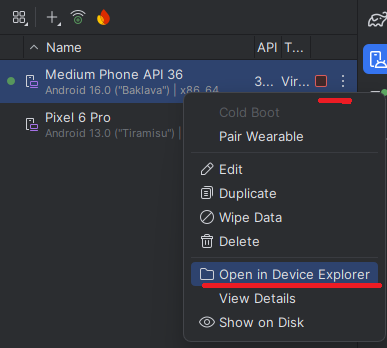
In Android Studio, open the tool window menu location shown in the screenshot and then open Device Explorer.
Then browse to the app data path:
data/data/<your-package>/shared_prefs/PREFS_NAME.xml
Package examples:
com.example.tictacmenu(main tutorial project)com.example.tictactoe(sandbox / twin project)
Typical XML entry you will see:
<boolean name="stayConnect" value="true" />
Recommended action (easier and more reliable than editing):
- Stop the app first (close it / stop the running app).
- In Device Explorer, delete:
data/data/<your-package>/shared_prefs/PREFS_NAME.xml
- Relaunch the app.
- Confirm the app stays on
LoginActivityinstead of jumping toMenuActivity.
Android Studio Device Explorer often opens a read-only temp copy of the XML.
Clear read-only status only affects the editor copy and may not push the change back to the emulator file.
For this lesson, deleting PREFS_NAME.xml is usually the simplest reset.
Why deleting works here:
LoginActivityreadsstayConnectwith defaultfalsewhen the file/key is missing- the file is recreated automatically later when the app saves preferences again
Troubleshooting
FirebaseAuth / FirebaseDatabase cannot be resolved
Your 018b assistant-generated setup did not land (or was reverted). Re-check:
- Auth SDK dependency was added
- RTDB SDK dependency was added
- Firebase project connection completed
- Gradle sync succeeded
Login always fails immediately
Check Firebase Console:
Authentication->Sign-in method->Email/Passwordis enabled- The test user exists
- Email/password are entered exactly
App crashes on Firebase init
Usually indicates Firebase setup/config is incomplete (for example missing or wrong google-services.json for this app package).
processDebugGoogleServices fails with No matching client found for package name ...
This usually happens in 018c when students skipped project creation and copied google-services.json from another app/package.
Quick fix:
- Open the same Firebase project you want to reuse (teacher/group project).
- Add this app package as an Android app in that Firebase project.
- Download the matching
google-services.json. - Replace
app/google-services.jsonand rebuild.
See 018b Step 3.1 / 3.2 for the detailed explanation.
Login screen seems to “disappear” after the first success
Usually not a bug. In this step, onStart() intentionally auto-opens MenuActivity when:
- a Firebase user session exists, and
Remember meis stored as checked
This continues until logout is implemented or app data is cleared.
Next lesson
Optional design detour: To give TicTacMenu the blue/orange palette, blue drawer toolbar, and clear square game cells used by the sibling sandbox, follow the small theming-alignment tutorial. This visual polish is optional and is not required to complete 018c or continue to 018d.
מורה־עזר ב־Gemini
פתחו את Gem: מאמן Firebase ל־TicTacToe כדי לקבל רמזים, שאלות אבחון והסברים המתאימים לשלב שבו אתם נמצאים.